

How to Reset the PHP Version to the Default Version in cPanel

If you want to reset the PHP version to the default version, follow these instructions:


1. Log in to your cPanel account.


2. In the Software section, click on MultiPHP Manager.

cpanel-multiphp-icon.gif

3. Scroll down to the bottom of the page. Select your domain from the left side of the screen. You can view the PHP Version from the drop-down menu on the right. Please, select the appropriate PHP version from it and click on Apply.
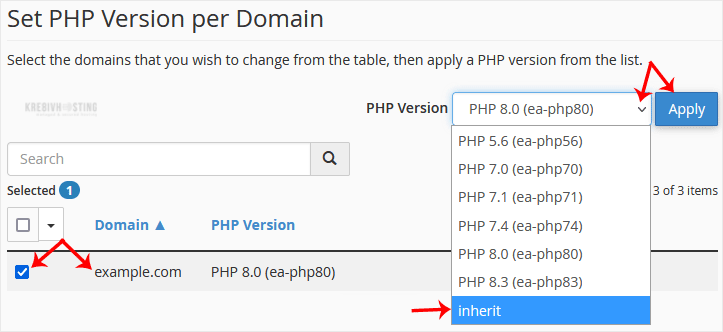
cpanel-multiphp-select-domain-full-reset.gif


It will take a few seconds, after which your PHP version will reset to the default version.

Răspunsul a fost util?

Articole similare

How to Reset cPanel's Account Password

If you have access to your cPanel account, follow these steps to reset your password:1. Log in to...

How to Change cPanel's Style/Theme

Switching over to another cPanel theme with a different style is easy.1. Log in to your cPanel...

How to Create a Cronjob in cPanel

1. Log in to your cPanel account. 2. In the Advanced section, click on Cron Jobs. 3. Under Add...

How to Update a Cronjob Email Address in cPanel

You can enable cronjob notifications or update a cronjob's email address in cPanel. 1. Log in to...

How to Change the PHP Version on Your Domain in cPanel

Some software requires a different version of PHP. You can switch the PHP versions using cPanel....